Run the designer
Open the designer
Section titled “Open the designer”The designer is hosted alongside this site: open the designer. It is open only to the addresses on its owner’s list, so it first sends you to sign in. It runs entirely in your browser and stores nothing — reloading the page loses unsaved work, so use Export JSON to keep a document.
The first screen asks you to choose a component pack — the visual language and component vocabulary the new document is bound to.
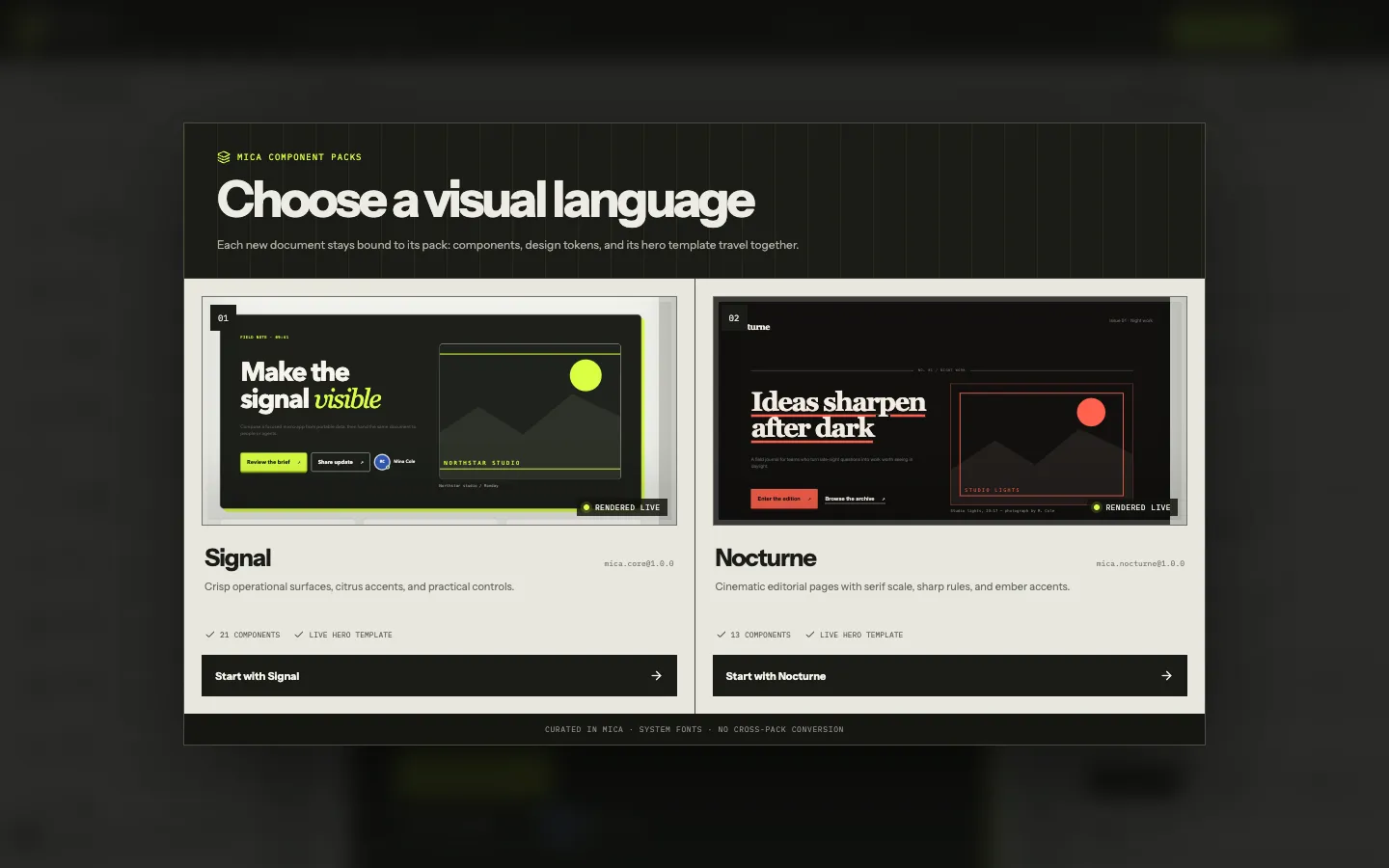
Pick one and Mica opens its two-page starter template. You can press New in the top bar at any time to choose again; replacing a started document is a single step you can undo.
AI mode
Section titled “AI mode”When the designer runs beside Mica’s agent service, it also offers AI mode: an AI button in the top bar opens an assistant that builds and changes the document from a description, and the pack picker gains Describe it instead. The hosted designer offers it once you sign in. See Build with AI mode for how to use it, and the agent service below to run it.
Map in the top bar swaps the canvas for a data map and a page-flow map. See Explore the data and page maps.
For contributors: run it from the repository
Section titled “For contributors: run it from the repository”The rest of this page is for readers with access to the Mica repository. You need Node.js 22.13 or newer and npm.
Install and start the designer
Section titled “Install and start the designer”From the repository root:
npm installnpm run devThe designer opens at http://localhost:4173, the same app as the hosted one.
Start the reference host
Section titled “Start the reference host”examples/mock-host is a small Vite application that embeds mica/runtime the
way a real product would. It is also an npm workspace of the root package, so
the install above covers it:
npm run dev --workspace examples/mock-hostIt opens at http://localhost:4174. Add ?principal=support to the URL to
sign in as a support user, for whom the customer name is read-only. The
embedding guide walks through its code.
Run the checks
Section titled “Run the checks”npm test # unit, model, pack, round-trip, mock-host and example-document testsnpm run typechecknpm run build # the designer's production buildnpm run build:lib # the mica/runtime package build, into dist-lib/npm test includes examples/documents/documents.test.ts, which imports every
example document on this site through Mica’s importer.
Agent tooling
Section titled “Agent tooling”npm run mica:pack # the agent knowledge pack, both packsnpm run mica:check -- path/to/doc.json # every reason import refuses a documentBoth run in plain Node from the TypeScript sources. With Claude Code, the
repository’s mica-author skill runs them for you; see build Mica documents
with an agent.
Start the agent service
Section titled “Start the agent service”npm run dev:agent # AI mode's agent service, beside npm run devIt needs an Anthropic API key in the repository’s git-ignored .env; the
designer’s dev server reaches it under /api. At start the designer asks
the service for its health: when it answers, the designer shows AI mode;
when nothing answers, as with npm run dev alone or the production build,
it shows none. See run AI mode locally, and
build with AI mode for using it.
Build and preview this site
Section titled “Build and preview this site”The documentation lives in site/, a self-contained Astro
Starlight project with its own dependencies.
npm ci --prefix site # once: install the site's own dependenciesnpm run docs:dev # live-reloading site at http://localhost:4321npm run docs:build # builds mica/runtime, then the static site into site/dist/npm run docs:preview # serves site/dist/ locallydocs:dev resolves mica/runtime straight to the TypeScript source, so edits
to Mica show up immediately. docs:build renders the live examples through the
built package in dist-lib/, which is why it runs build:lib first. The build
output is a folder of static files you can serve locally.