Preview and debug
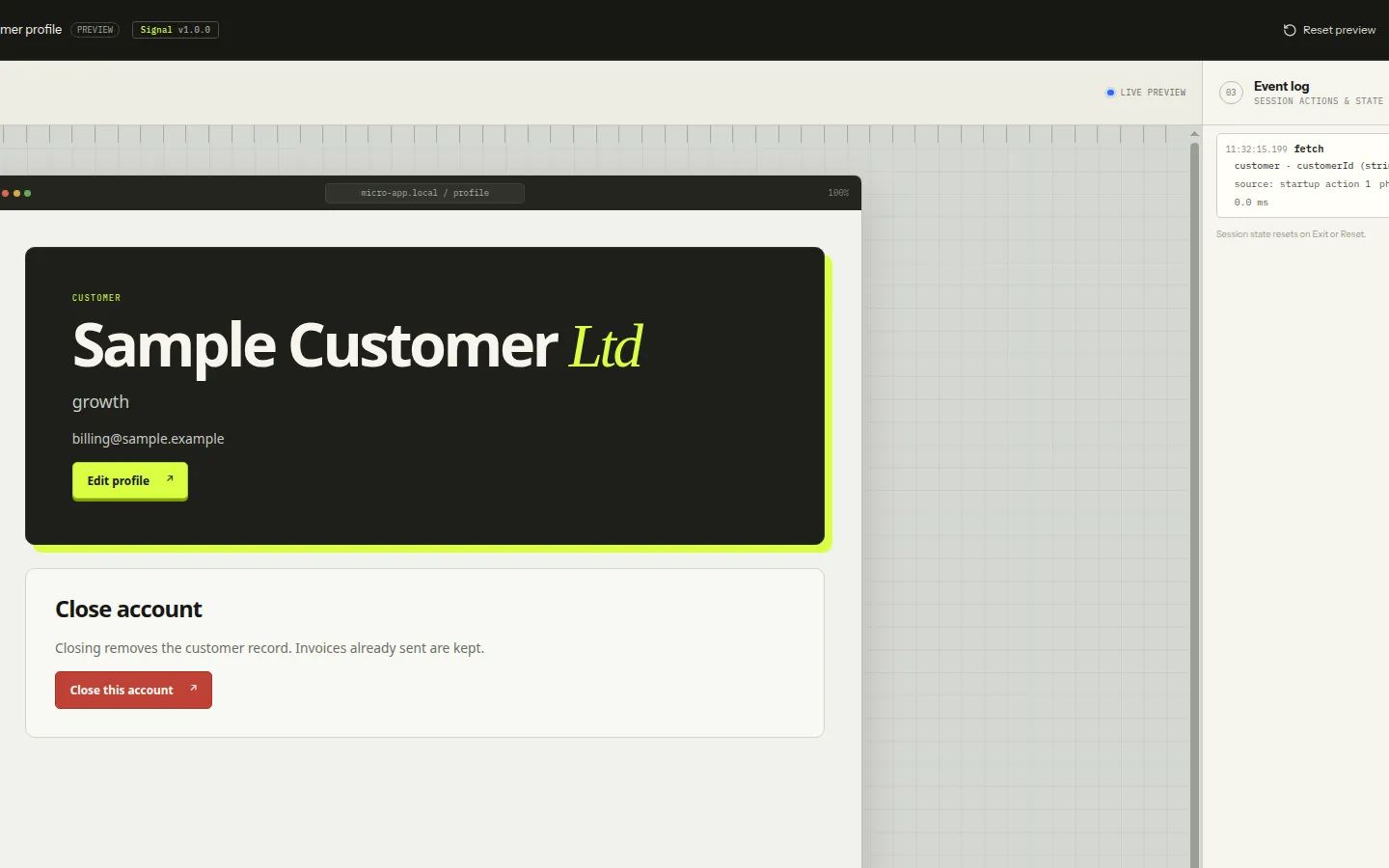
Press Preview in the top bar to run the open document for real. Mica first checks the document’s interactions with the same validators import uses; if anything is wrong it shows Fix document errors before previewing. and stays in edit mode. When Preview starts, it closes Map and clears field highlights.
What runs in the preview
Section titled “What runs in the preview”The preview takes a snapshot of the document and seeds a fresh session store
from its state, plus each declared business object’s design sample at
/objects/{alias}/data. It then binds an offline mock host built from
those declarations, samples, and any fixtures in the document’s
{stem}.mica-design.json sidecar.
With no sidecar, every declared verb auto-plays its sample (host actions
succeed). Then:
- Buttons fire their actions.
setStatewrites the session store andgoToPageswitches the preview’s page. $bindStateform controls are editable and write the session store. An Input fires itscommitactions when you press Enter (a text area: never) or leave the field after changing it (a typed date too, a date picked from a calendar at once); a NumberField, Choice or Toggle on each change; a Slider when you let go of it. Unbound controls stay read-only. A control whosewritablereads a declared field follows the mock: fields are writable when the alias declaresupdate.visibleconditions and$condmarkers react to every change.- Business-object verbs and declared host actions run against the mock.
Fixture outcomes are
sample,error,fieldErrors,delayandnot-found; host actions succeed, or reject as cancelled or failed. A rejection stops the rest of the event, so a Save that thengoToPages stays on the form when the mock returns field errors. Adelete, and acreateorupdatethat carries aconfirmation, first asks it exactly as the runtime would; declining records cancelled. lifecycle.startupdoes run against the mock, so fetch-on-start is visible.- A later fetch of the same alias returns the session’s current data, including writes this preview made, until Reset. A record with no design sample fetches as not-found.
While the preview is open, authoring and document undo are disabled.
Declared capabilities report as implemented and allowed in this mock, so a
control gated on …/capabilities/update/allowed shows. A live host can
still hide it. The canvas (edit mode) stays disconnected: samples render,
verbs do not run.
The event log
Section titled “The event log”The panel on the right records every action dispatch and settle, newest last:
the action name, a summary of its parameters, whether it succeeded, how long
it took, and the state paths it changed as path: before → after. Object
action rows name the object and its declared input names and kinds — never
the values — plus the element whose event fired it (a Button’s press or a
form control’s commit) and the resulting phase. Hide
collapses the panel and Clear log empties it.
Reset and exit
Section titled “Reset and exit”- Reset preview recreates the session from the entry snapshot and returns to the first page.
- Exit preview, or Esc, discards the session and returns to editing.
Nothing done in the preview is ever written to the document, exported, or added to undo history.
Testing with real host behaviour
Section titled “Testing with real host behaviour”The designer preview is offline on purpose: it plays samples and sidecar
fixtures, never a live host. To exercise real fetches, writes, permission
answers and host errors, run the document in a host. The live examples on
this site do that with in-browser stand-in hosts, and examples/mock-host
does it with a hand-written binding you can edit.