Load, create, update and delete records
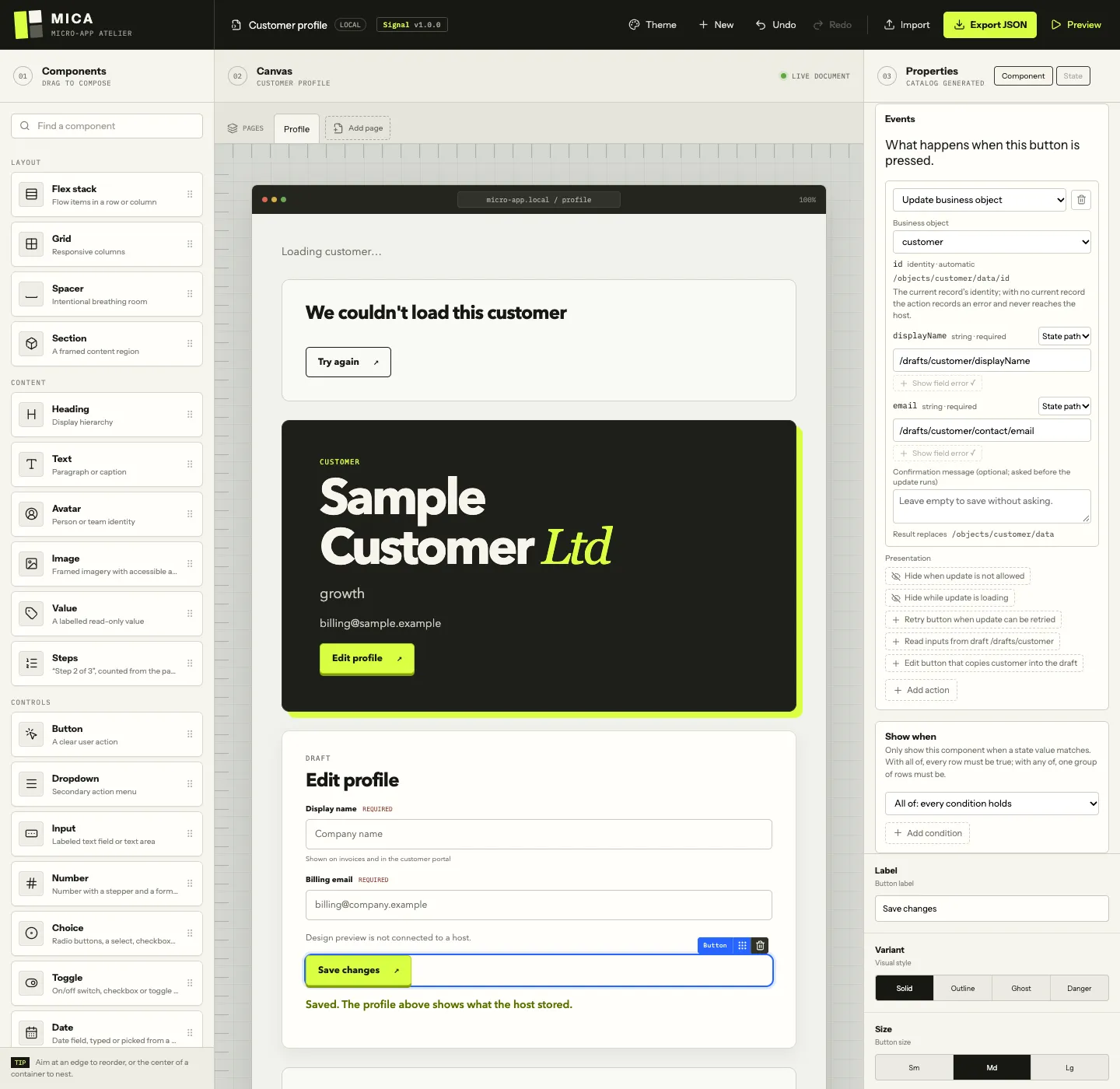
Once a declaration enables a capability, the Events section of a Button
(and of an Input, for its commit) offers it: Fetch business object, Create business object, Update business
object and Delete business object. Generate form from declaration on
the object card scaffolds the draft controls and the Create / Save
button — see
Declare a business object.
Each action names the object by its
literal alias and supplies the declared inputs:
{ "action": "update", "params": { "object": "customer", "inputs": { "displayName": { "$state": "/drafts/customer/displayName" } } } }Each input is a literal JSON value allowed by its declaration, or one
{ "$state": "/path" } read that is resolved when the event fires. An
input the capability does not declare is refused at import.
How writes behave
Section titled “How writes behave”Writes are pessimistic: the document’s copy of the record changes only when the host answers successfully.
| Verb | Sends | On success |
|---|---|---|
fetch |
its inputs | the host’s record replaces /objects/{alias}/data |
create |
its inputs | the host’s complete new record, including the identity it issued, replaces the data |
update |
the current record’s identity plus its inputs | the host’s complete saved record replaces the data |
delete |
the current record’s identity plus its inputs | the data becomes null |
updateanddeleteread the identity from the current record themselves. It is never an input, and with no current record the action fails withno-current-recordwithout asking the host. A collection’s rows are written by identity instead: see Edit a host row.- Only declared fields of a response are kept; the rest is dropped. A response
missing a required field, or an update that answers for a different record,
becomes a
host-contracterror instead of changing the data. - One operation per object at a time. Pressing a second action on the same
alias while one is running is rejected as busy and changes nothing. The
exception is a second
fetch: a fetch a press or an Input’scommitdispatches replaces a fetch of the same object that another press or commit started and that is still running. Only the latest answer lands, and the replaced fetch rejects as superseded, stopping its event. - A result that arrives after the host re-seeds or unmounts the session is dropped as stale.
Edit through a draft
Section titled “Edit through a draft”A document never edits the object’s data directly — no setState or
$bindState may target /objects/{alias} or /meta/objects/{alias}. Instead:
- An Edit button copies the record into ordinary state with one
setState. - Inputs bind to fields of that copy.
- The Save button’s update reads its inputs from the copy.
{ "summary-edit": { "type": "Button", "props": { "label": "Edit profile", "variant": "solid", "size": "md", "disabled": false, "fullWidth": false }, "children": [], "on": { "press": { "action": "setState", "params": { "statePath": "/drafts/customer", "value": { "$state": "/objects/customer/data" } } } }, "visible": { "$state": "/meta/objects/customer/capabilities/update/allowed", "eq": true } }, "name-input": { "type": "Input", "props": { "label": "Display name", "placeholder": "Company name", "inputType": "text", "required": true, "helpText": "Shown on invoices and in the customer portal", "value": { "$bindState": "/drafts/customer/displayName" }, "writable": { "$state": "/meta/objects/customer/fields/displayName/writable" }, "error": { "$state": "/meta/objects/customer/operations/update/error/fieldErrors/displayName" } }, "children": [] }, "save": { "type": "Button", "props": { "label": "Save changes", "variant": "solid", "size": "md", "disabled": false, "fullWidth": false, "busy": { "$cond": { "$state": "/meta/objects/customer/operations/update/phase", "eq": "loading" }, "$then": true, "$else": false }, "busyLabel": "Saving…" }, "children": [], "on": { "press": { "action": "update", "params": { "object": "customer", "inputs": { "displayName": { "$state": "/drafts/customer/displayName" }, "email": { "$state": "/drafts/customer/contact/email" } } } } } }}The copy is a snapshot taken on the press, not a live link: a later fetch does not overwrite what someone is typing, and the record on screen changes only when the host confirms the save.
The inspector builds this for you. On a Button that dispatches a write, the Presentation helpers add:
- Edit button that copies alias into the draft (update only) — a
setStateof the record into/drafts/{alias}; - Read inputs from draft /drafts/alias (create and update) — points every input at the same-named draft field;
- Hide when op is not allowed, Hide while op is loading, and a Retry button when op can be retried.
To keep the Button in place instead of hiding it, set its Busy property to
Operation and pick the write: the Button is busy while that operation’s
phase is loading, ignores presses, and shows its Busy label when it has
one. Disabled takes a condition the same way, under When.
Each input row also has a Show field error button that sets that input’s
error as the error of every control the
input is sent from, or adds a Text showing it, visible only while there is
one, where no control can carry it.
Show progress, success and errors
Section titled “Show progress, success and errors”Everything about an operation is in state, so ordinary Text and conditions show it:
{ "saved": { "type": "Text", "props": { "content": "Saved. The profile above shows what the host stored.", "size": "md", "tone": "accent", "align": "left", "italic": false }, "children": [], "visible": { "$state": "/meta/objects/customer/operations/update/phase", "eq": "success" } }, "save-error": { "type": "Text", "props": { "content": { "$state": "/meta/objects/customer/operations/update/error/message" }, "size": "md", "tone": "accent", "align": "left", "italic": false }, "children": [], "visible": { "$state": "/meta/objects/customer/operations/update/phase", "eq": "error" } }}The Button that runs the write shows progress itself: busy takes a condition
on the phase, and busyLabel replaces its label while it holds. A busy Button
ignores presses, so a second save cannot start while the first runs:
{ "save": { "type": "Button", "props": { "label": "Save changes", "variant": "solid", "size": "md", "disabled": false, "fullWidth": false, "busy": { "$cond": { "$state": "/meta/objects/customer/operations/update/phase", "eq": "loading" }, "$then": true, "$else": false }, "busyLabel": "Saving…" }, "children": [], "on": { "press": { "action": "update", "params": { "object": "customer", "inputs": { "displayName": { "$state": "/drafts/customer/displayName" }, "email": { "$state": "/drafts/customer/contact/email" } } } } } }}A failure is stored as a safe envelope at
/meta/objects/{alias}/operations/{op}/error:
{ "category": "validation", "code": "input-invalid", "message": "This request does not match the object's declared inputs.", "retryable": false, "fieldErrors": { "displayName": "must be at least 2 characters" } }category is one of validation, permission, not-found, conflict,
unavailable, cancelled or unknown. fieldErrors is keyed by declared
input names only; a host message for anything else is dropped. Stacks, raw
responses and transport details never reach the document — a host error Mica
cannot read becomes The host could not complete this request.
Stop the rest of an event when a write fails
Section titled “Stop the rest of an event when a write fails”A write that is busy, cancelled, fails or goes stale rejects, so the actions after it in the same event do not run; so does a fetch a newer one superseded. That makes “save, then move on” safe:
{ "submit": { "type": "Button", "props": { "label": "Submit ticket", "variant": "solid", "size": "md", "disabled": false, "fullWidth": true, "busy": { "$cond": { "$state": "/meta/objects/ticket/operations/create/phase", "eq": "loading" }, "$then": true, "$else": false }, "busyLabel": "Sending…" }, "children": [], "on": { "press": [ { "action": "create", "params": { "object": "ticket", "inputs": { "email": { "$state": "/drafts/ticket/email" }, "subject": { "$state": "/drafts/ticket/subject" }, "description": { "$state": "/drafts/ticket/description" }, "priority": { "$state": "/drafts/ticket/priority" }, "callbackPhone": { "$state": "/drafts/ticket/callbackPhone" } } } }, { "action": "goToPage", "params": { "page": "page-received" } } ] } }}If the create fails, the person stays on the form with the errors showing. On
a form that spans pages, that is the review page the submit is on, so show
each input’s field error there as well as in its control’s error on its own
step (see forms). A failed fetch does
not stop the event: the last good record is still there.
Confirm a write
Section titled “Confirm a write”delete requires a confirmation — one line of plain text, at most 240
characters, never a $state read — that Mica shows before anything is sent:
{ "danger-button": { "type": "Button", "props": { "label": "Close this account", "variant": "danger", "size": "md", "disabled": false, "fullWidth": false }, "children": [], "on": { "press": { "action": "delete", "params": { "object": "customer", "confirmation": "Close this customer account? This cannot be undone." } } }, "visible": { "$state": "/objects/customer/data" } }}create and update take the same confirmation, optional there. With one,
Mica asks before the write runs; without one, it runs at once:
{ "action": "update", "params": { "object": "order", "inputs": { "status": { "$state": "/draft/status" } }, "confirmation": "Submit this order? It can no longer be edited." }}The confirming button reads Delete for a delete and Confirm otherwise. In
the designer, the Events section’s Confirmation message field sets the
confirmation.
The runtime asks through createObjectConfirmationGate and renders the question
with ObjectConfirmationDialog: Cancel is focused first and Esc
cancels. Declining rejects the action as cancelled. The designer’s preview asks
the same question. json-render’s own binding-level confirm is refused at
import, because it would interpolate state into the message and report the
action finished before the person answered.
Try it
Section titled “Try it”The customer profile example runs fetch, update
and delete against an in-browser host — try renaming the customer to ACME to
see a host field error — and the support ticket
example runs create.