Declare a business object
A business object is a record that belongs to the host — a customer, a ticket, a purchase request. The document does not fetch it itself. Instead it declares what it expects: which kind of record, which fields it reads, and which operations it uses. The host binds that declaration to its own service, and Mica projects the result into ordinary state.
This guide uses the customer profile example.
What a declaration says
Section titled “What a declaration says”Declarations live in the envelope’s objects map, keyed by a document-local
alias:
{ "customer": { "type": "crm.customer", "cardinality": "one", "identity": "id", "fields": { "id": { "kind": "string", "required": true }, "displayName": { "kind": "string", "required": true }, "plan": { "kind": "string", "required": true, "enum": [ "starter", "growth", "scale" ] }, "contact": { "kind": "object", "required": true, "fields": { "email": { "kind": "string", "required": true, "format": "email" } } } }, "capabilities": { "fetch": { "inputs": { "customerId": { "kind": "string", "required": true } } }, "update": { "inputs": { "displayName": { "kind": "string", "required": true, "minLength": 2, "maxLength": 60 }, "email": { "kind": "string", "required": true, "format": "email" } } }, "delete": {} }, "sample": { "id": "cus_sample", "displayName": "Sample Customer Ltd", "plan": "growth", "contact": { "email": "billing@sample.example" } } }}| Member | Meaning |
|---|---|
alias (customer) |
The name the document uses. Letters, digits and _, starting with a letter, up to 64 characters. |
type |
The host’s stable type key, such as crm.customer — dot-separated names, never a URL. Preflight refuses a binding whose type key differs. |
cardinality |
"one" for a single record, or "many" for a collection of records shown as a list, whose rows are written by identity. |
identity |
The one field that identifies the record. It must be a top-level string, integer or number field that is required and not nullable. |
fields |
The projection the document reads. Anything else the host knows about the record never reaches the document. |
capabilities |
Which of fetch, create, update and delete the document uses, each with its typed inputs. |
sample |
An optional design-time record that drives the canvas and preview. A host never shows it. |
Each field has a kind — string, number, integer, boolean or object
(which nests fields, up to six levels) — and may add required, nullable,
an enum of allowed values (string, number and integer kinds), a presentation format
(date, date-time, email, uri, string kind only), and the declarative
constraints covered in field rules. Arrays are not a
field kind. A document may declare up to 32 objects, each with up to 64 fields per level.
Declare one in the designer
Section titled “Declare one in the designer”-
Open the inspector’s State tab and switch to Objects.
-
Under Add expected object, enter an alias (for example
customer), the host type key (crm.customer), and the identity field’s name and kind, then press Add object. The identity is created required and non-null. -
Add fields with the field name box, the kind menu and Add field. Pick a parent in the first menu to nest a field inside an
objectfield. Use the req and null checkboxes forrequiredandnullable. -
Tick the capabilities the document will use and add their inputs — each input has a name, a kind and a req checkbox. For
updateanddeletethe identity is shown as identity · automatic: the runtime supplies it, so it is never an input. -
Fill the Design sample from the declaration’s field tree. Required fields are seeded, enum fields are a dropdown (a required enum with no matching value starts on a disabled Choose…), booleans are
unset/true/false, and other leaves commit on blur or Enter. A collection has one record editor per sample row, plus Add row. Clear sample drops the sample. It is authoring material only: it drives the canvas and the preview’s mock host, and is never a credential or live host data.
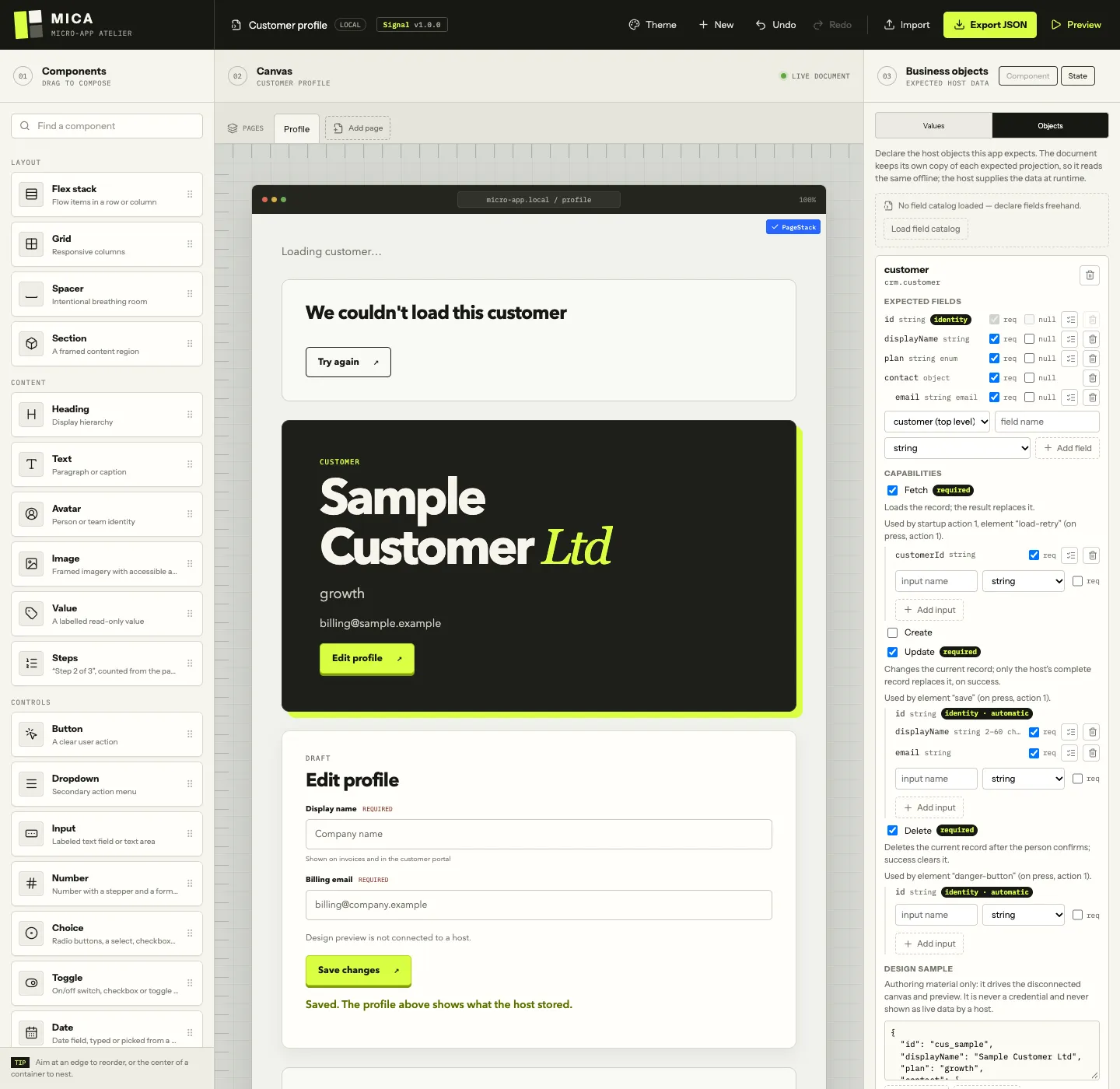
enum and format are shown in the field list but set in the document’s JSON
or brought in from a field catalog (below). A declaration, field, capability or
input that the document still uses cannot be deleted. Select a field to see
Used by — the Text, Input, condition and event sites that reference that
path. A capability lists its users under its checkbox, and shows a
required badge while something still uses it.
When a field change would make the saved sample invalid — a new required field, or a field marked required or non-null — Mica fills the affected sample paths with placeholders of the right type in the same change and names them.
Generate a form from the declaration
Section titled “Generate a form from the declaration”Generate form from declaration (next to Add field) inserts a Stack at the top of the open canvas page. With no page open it says Open a page on the canvas to insert into.
- With create (else update) enabled, one control per that capability’s
inputs, bound to
/drafts/{alias}/…. The submit Button is Create or Save. An update of a single record also prepends Edit, which copies/objects/{alias}/datainto the draft. - With no write capability, one control per declared leaf (not the identity),
with local
rulescopied from the field when it hasrequired,enumor a constraint (and only onto rule-capable controls), errors under/errors/{alias}/…, and, when any control has rules, a Check button that dispatchesvalidate. - An enum field becomes a Choice whose options are that enum (radio if four or fewer values, otherwise a select) — the same options Copy options from the field’s enum would write. A boolean becomes a Toggle, a number or integer a NumberField, a date format a DateField, anything else an Input.
Start from a host field catalog
Section titled “Start from a host field catalog”A host can hand authors a field catalog: a JSON file listing the fields it offers, with their kinds and rules. Load field catalog reads one for the current session; its entries appear as a palette in each declaration, and picking one copies it in as an ordinary field. The catalog itself is never stored in the document or the browser.
{ "catalogVersion": 1, "entries": [{ "key": "surname", "label": "Surname", "kind": "string", "required": true, "maxLength": 80 }] }Load the record when the app starts
Section titled “Load the record when the app starts”lifecycle.startup is an ordered list of fetch actions a host runs once when
it starts the app. In the Objects view, When this app starts edits it: add a
startup action, choose the object, and give each input a literal value or a
state path.
{ "lifecycle": { "startup": [ { "action": "fetch", "params": { "object": "customer", "inputs": { "customerId": { "$state": "/customerId" } } } } ] }}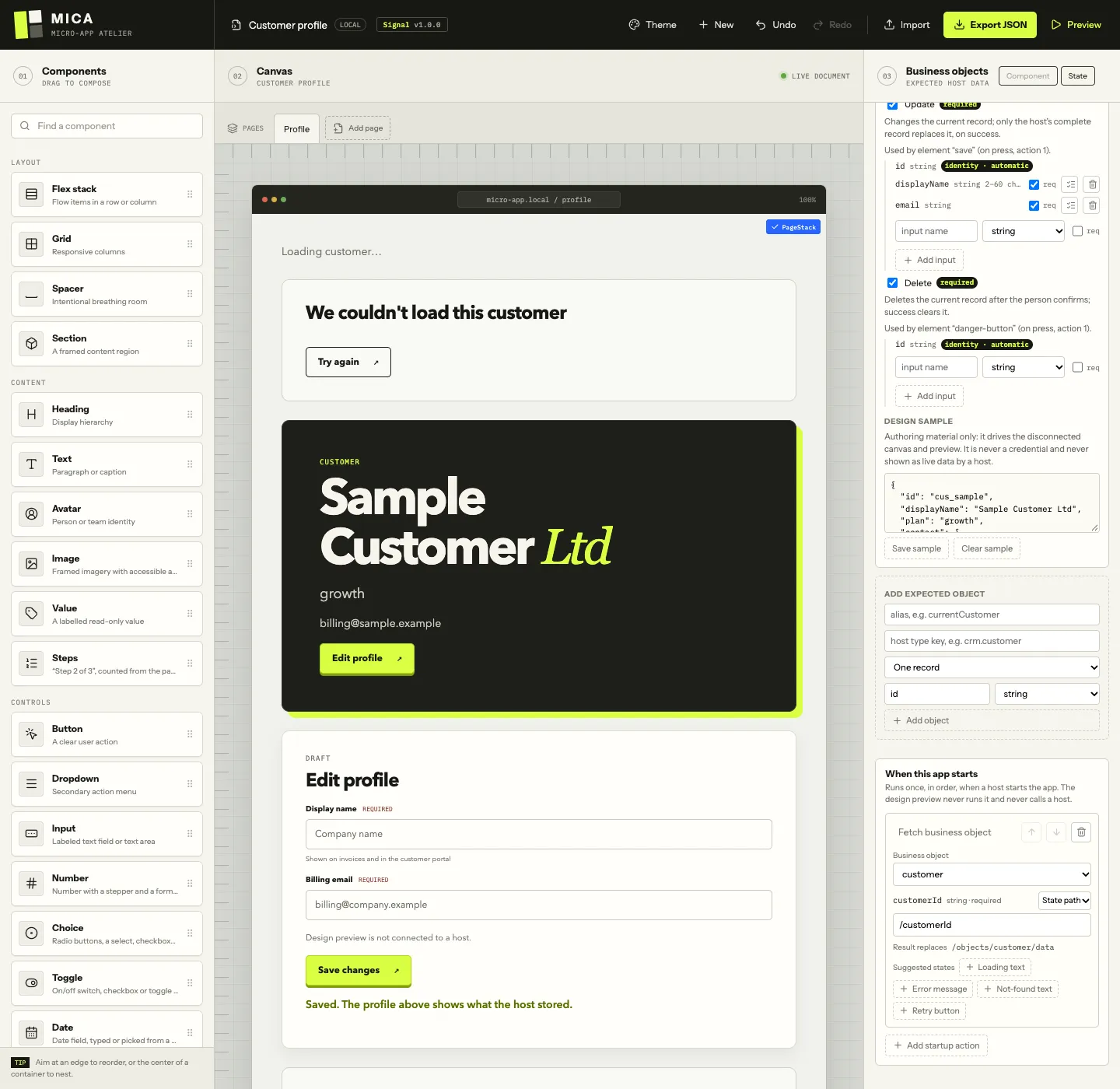
Startup may carry up to eight entries, and only fetch. It runs in the
preview’s mock, not on the edit canvas. Each startup card also offers Suggested
states — one click adds a Loading text, an Error message, a Not-found
text or a Retry button to the open page, already wired to the fetch’s
lifecycle state.
Show the record
Section titled “Show the record”Bind Text or Heading content to a declared field: under Content choose
Business object, then the object and one of its fields. Only fields whose
kind the prop can show are offered. The document stores an ordinary read:
{ "summary-name": { "type": "Heading", "props": { "content": { "$state": "/objects/customer/data/displayName" }, "level": "1", "align": "left", "accent": true }, "children": [] }}A fetch can also be put on a Button — Fetch business object in its Events section — for a reload or retry.
The state a declaration projects
Section titled “The state a declaration projects”Once an alias is declared, the runtime keeps these paths up to date. Documents
may read them with $state and visible, but no document write may target
them:
| Path | Holds |
|---|---|
/objects/{alias}/data |
The current record with only its declared fields, or null |
/meta/objects/{alias}/operations/{op}/phase |
idle, loading, success or error |
/meta/objects/{alias}/operations/{op}/error |
null, or { category, code, message, retryable, fieldErrors? } |
/meta/objects/{alias}/operations/{op}/error/fieldErrors/{input} |
The message for one declared input |
/meta/objects/{alias}/capabilities/{op} |
{ implemented, allowed, reason? } |
/meta/objects/{alias}/fields/{field} |
{ writable, reason? } for each declared leaf field, nested names dot-joined (contact.email) |
A read of something the runtime does not project — an undeclared field, an
unknown operation, …/phase/extra — is refused at import, so an element can
never silently blank. {op} is one of fetch, create, update, delete.